How to join a Sendd marketplace
Learn how to browse, join and track Sendd marketplaces to sell in front of a bigger audience.
Category: Marketplaces and growth
A Sendd marketplace is a curated, multi-seller storefront that puts your products in front of shoppers you would not otherwise reach. Instead of relying only on your own store link, you list your catalog inside a shared storefront with other sellers, and the marketplace operator handles the discovery and traffic. This guide walks through how to find marketplaces, join them, choose which products appear and track your marketplace earnings.
What a Sendd marketplace is and when to use it
Marketplaces sit alongside your own store, not instead of it. You keep My store and My products exactly as they are, and you opt selected products into one or more marketplaces from the same admin. Use a marketplace when you want extra distribution without building a new storefront, when a marketplace’s audience matches your product type (for example, a beauty marketplace for skincare sellers) or when you want to test demand for a product line in a new channel before investing in dedicated marketing.
Each marketplace sets its own commission and join policy, so you choose which ones make sense for your margins and your product mix before you apply.
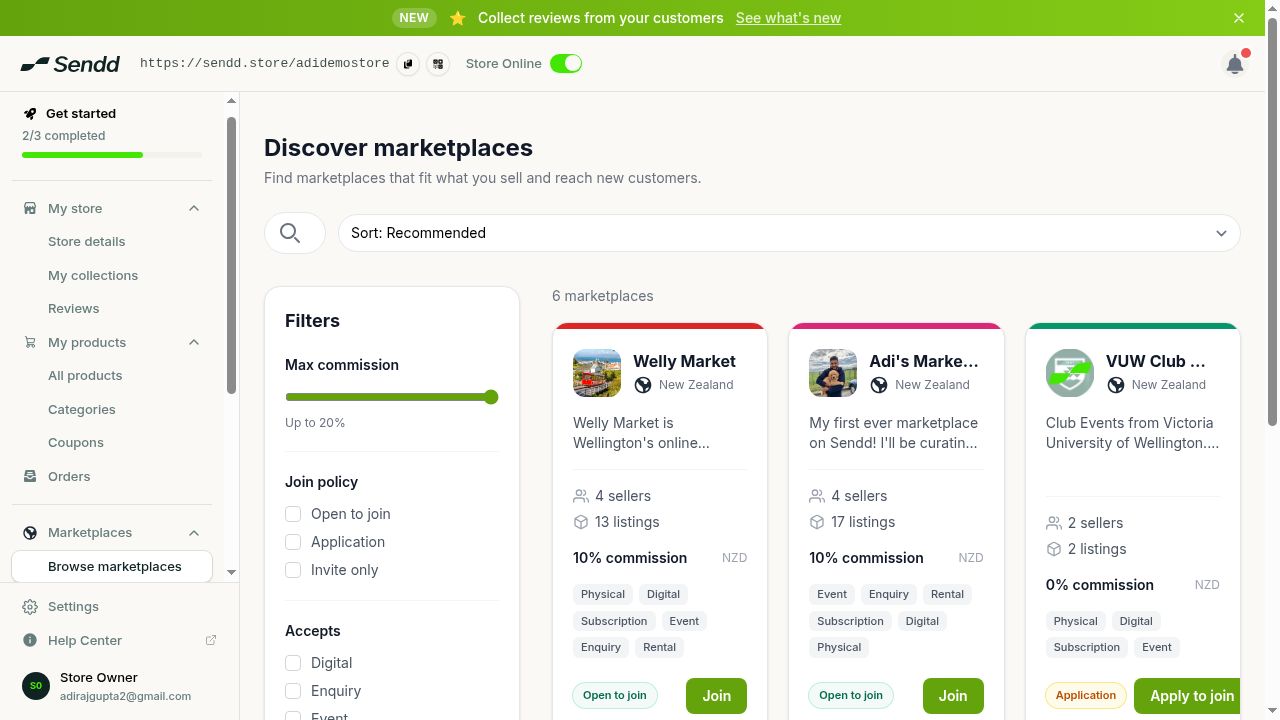 Discover and join marketplaces, filtered by commission and policy.
How to find and join a marketplace
Steps:
- Open
Marketplacesin the sidebar. - Select
Browse marketplacesto see the full list of marketplaces open for new sellers. - Filter the list by max commission, join policy (open, application or invite-only) and the product types the marketplace accepts, so you only see marketplaces that fit your store.
- Review a marketplace’s details, then select
Joinif it is open, orApply to joinif it requires an application. - Check
My marketplacesto see your memberships, split acrossActive,PendingandInvitationstabs.
Open marketplaces add you as a member right away. Application-only marketplaces review your store before approving you, so your status shows as pending until the operator responds. Invite-only marketplaces only appear once an operator sends you an invitation, which lands in the Invitations tab.
Choosing which products appear
Joining a marketplace does not automatically push your whole catalog into it. You control this at the product level using the marketplaces commission threshold in Step 2 of the product builder when you add or edit a product. Set a threshold that matches the maximum commission you are willing to pay, and only marketplaces whose commission falls within that threshold will be eligible to list that product. This keeps low-margin items out of high-commission marketplaces while still letting your bestsellers reach as many marketplaces as possible.
Tip. Start by opting in your best-reviewed or highest-margin products, then expand to the rest of your catalog once you can see how a marketplace performs.
Marketplace payouts and earnings
Marketplace sales are tracked separately from your regular store orders. Open Earnings to see your pending payout and lifetime earnings from every marketplace you belong to. Before Sendd can pay out marketplace earnings, you need to complete a one-time bank payout setup, which links the bank account your marketplace earnings are sent to.
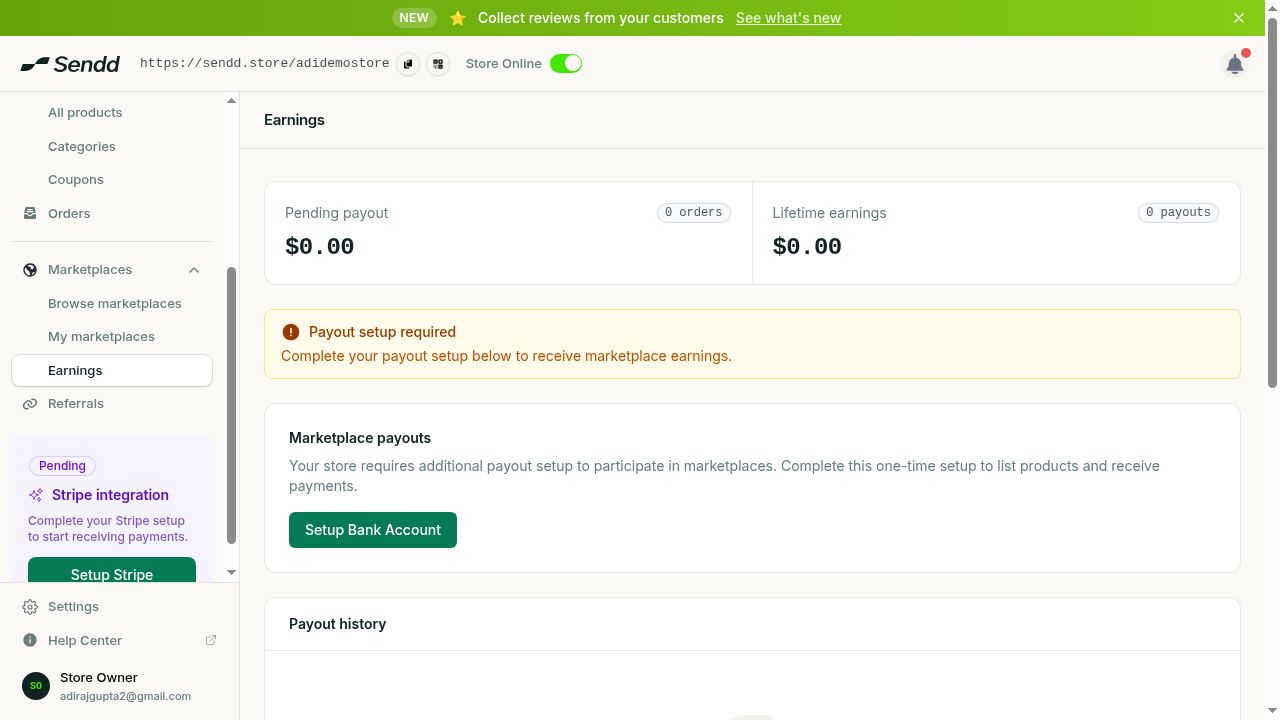 Earnings tracks marketplace payouts.
How marketplace commission works
Each marketplace operator sets their own commission rate, which is separate from Sendd’s standard 1% platform fee on your own store. On marketplace sales, the operator keeps 80% of the commission they set, and Sendd’s take is 20% of that same fee. There is no extra subscription cost to join a marketplace: you only pay the commission on the sales that actually happen inside that marketplace.
Example: skincare seller joining an open beauty marketplace
A skincare seller sets a marketplaces commission threshold that covers up to 15% commission, browses marketplaces, finds an open beauty marketplace charging 12% commission and selects Join straight away. Their eligible products appear in the marketplace within the threshold they set, and sales start flowing into Earnings as marketplace revenue.
Example: applying to a curated homeware marketplace
A homeware seller finds a marketplace marked as application-only with a strong audience match. They select Apply to join, and the membership shows under the Pending tab in My marketplaces while the operator reviews the store.
Note. Invite-only marketplaces cannot be applied to directly. Wait for an invitation to appear under the
Invitationstab inMy marketplaces.
Frequently asked questions
What is a Sendd marketplace?
It is a curated, multi-seller storefront run by a marketplace operator. Joining one lists your eligible products alongside other sellers’ products, giving you access to an audience beyond your own store.
How does marketplace commission work?
Each operator sets their own commission rate on sales made through their marketplace. The operator keeps 80% of that commission, and Sendd’s take is 20% of the same fee.
How do I get accepted into an application-only marketplace?
Select Apply to join on the marketplace’s page. Your request shows under the Pending tab in My marketplaces until the operator reviews and approves it.
When do marketplace payouts arrive?
Marketplace earnings appear under Earnings as pending payout and lifetime earnings. You need to complete a one-time bank payout setup before Sendd can send you a marketplace payout.
Which of my products show up in a marketplace?
Only the products whose marketplaces commission threshold, set in Step 2 of the product builder, covers that marketplace’s commission rate. You control this threshold per product.
Can I leave a marketplace once I have joined?
Manage your memberships from My marketplaces, where you can review your Active, Pending and Invitations tabs at any time.
Do I need a separate store for each marketplace?
No. Marketplaces list products from your existing store, so you manage everything from the same My products catalog rather than creating a new storefront.
Does joining a marketplace cost anything upfront?
No subscription is required to join. You only pay the marketplace’s commission on sales that happen through it, on top of Sendd’s standard 1% platform fee.
Next steps. Set your marketplaces commission threshold on a product, then explore how to earn with the Sendd referral program for another way to grow your store’s revenue.
Related articles