How to accept tips, donations and pay-what-you-want on Sendd
Let customers enter their own amount at checkout for tips, donations and flexible payments
Category: Ways to sell
If you want to collect tips, run a fundraiser or let customers decide what to pay, the Custom price product type on Sendd (labelled Type Your Price) removes the fixed price entirely and lets the buyer enter their own amount at checkout. It is a simple, flexible way to accept payments when you do not want to, or cannot, set a single price.
A Custom price product is also known as a Type your price product.
What it is and when to use it
A custom price product has no fixed price set by you. Instead, the storefront shows an Enter your price field, and the customer types in the amount they want to pay before completing checkout. This makes it useful for:
- Tips for staff, creators or service providers
- Donations and fundraising campaigns
- Pay-what-you-want products such as digital downloads or content
- In-person payments where you want to key in a specific amount on the spot
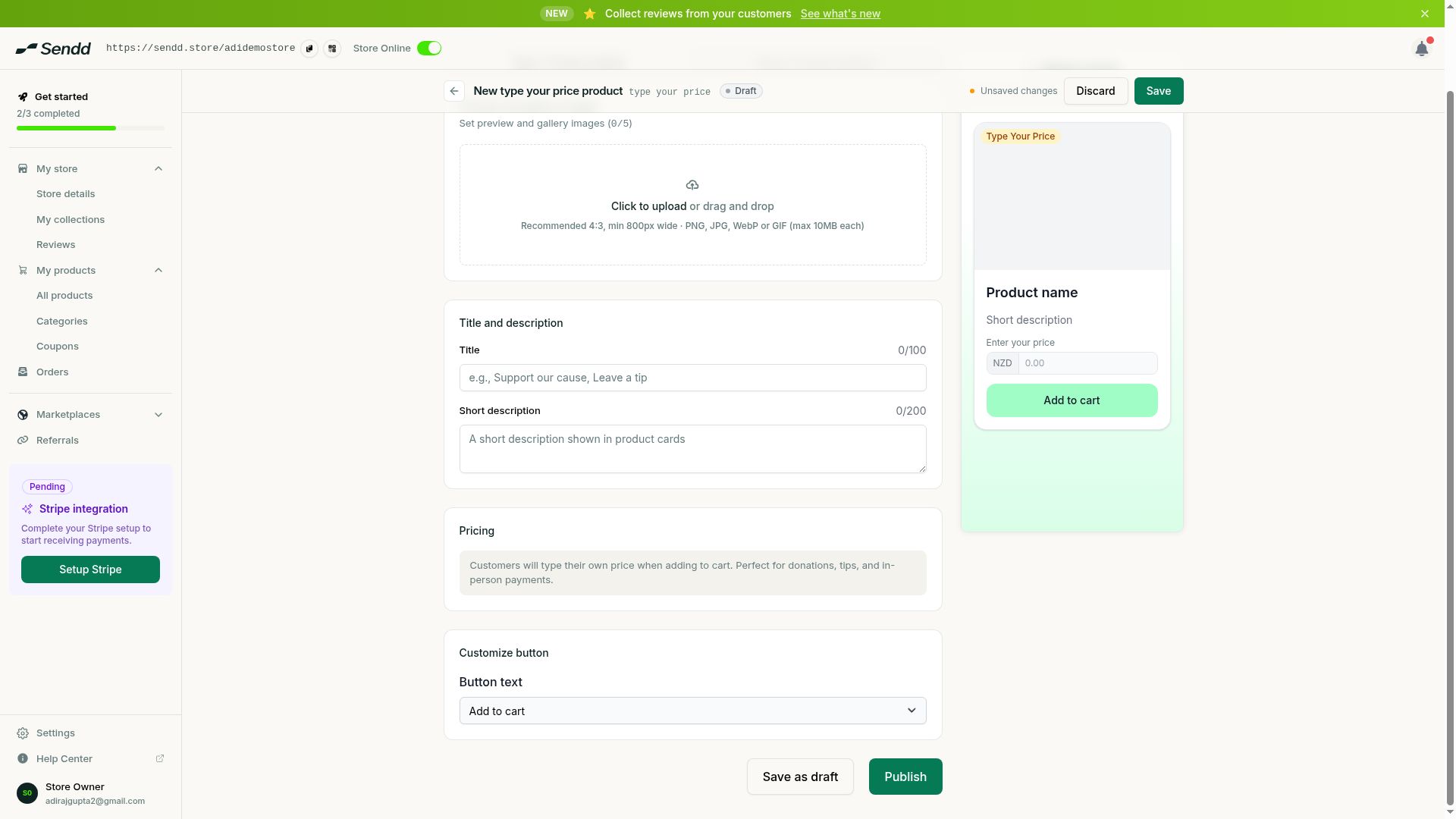 Customers enter their own amount, ideal for tips and donations.
How to create a custom price product
Steps:
- Go to
My products, then selectAll productsand selectAdd new product. - Choose the
Custom priceproduct type (shown asType Your Price). - In Step 1, write a clear title that tells buyers exactly what the payment is for, for example “Support our cafe” or “Leave a tip”.
- Add a description that explains the purpose of the payment in plain language, since there is no fixed price to give context on its own.
- Add a gallery image if it helps explain what the payment supports.
- Continue through Step 2 to finish your details page and Step 3 to review product options, then select
Publish. - Make sure Stripe is connected to your store so these payments can be processed at checkout.
Understanding the options and fields
- Enter your price. The field shown to customers on the storefront where they type in the amount they want to pay. There is no fixed price attached to the product.
- Title and description. Since the price is left entirely up to the customer, your title and description carry the job of explaining what the payment is for and why someone might choose to pay more or less.
Because there is no price field for you to set, the clarity of your title and description matters more on a custom price product than on almost any other product type. Buyers need to understand instantly what they are paying for before they decide on an amount.
Use case examples
- Cafe tip jar. A cafe adds a “Leave a tip” product with a friendly description asking customers to support the team, and shoppers enter whatever amount feels right.
- Fundraiser. A community group creates a “Donate to our fundraiser” product describing the cause, letting supporters choose their own contribution amount.
- Pay-what-you-want download. A creator offers a guide or template with a description suggesting a fair price, but lets buyers who cannot afford that amount still pay what they can.
Tip. If you have a suggested amount in mind, mention it directly in your description, such as “most people choose around $20”, since there is no default value shown in the price field itself.
Note. Because pricing is entirely open, keep your title and description specific about what the payment covers so customers do not hesitate before checking out.
Frequently asked questions
Can I set a minimum amount for custom price products?
The Custom price product type is built around the customer entering their own amount in the Enter your price field on the storefront, with no fixed price set by you.
Can I use custom price for donations or fundraising?
Yes. It works well for donations and fundraising because supporters can enter whatever amount they want to give.
Can I use custom price for tips?
Yes. Tips are one of the most common uses, letting customers or clients decide their own tip amount at checkout.
Can I use it for in-person payments?
Yes. You can key in a specific amount using the Enter your price field for a payment taken in person, rather than only online.
What fees apply to custom price sales?
Sendd charges its usual 1% platform fee per sale, and Stripe’s payment processing fees apply on top of that, the same as any other product type.
How is custom price different from an enquiry product?
A custom price product takes payment immediately with the buyer choosing the amount, while an enquiry product generates a lead first (with an Enquire now button) rather than collecting payment on the spot.
Do I need to add a description to a custom price product?
It is strongly recommended. Since there is no fixed price to give context, your title and description are what tell buyers what the payment is for.
Does Stripe need to be connected for custom price products?
Yes. Like all Sendd products, payments only process once you have connected Stripe to your store.
Next steps. If you would rather collect a lead before taking payment, read Enquiry products, or explore Digital products for pay-what-you-want downloads.
Related articles