How to sell digital products on Sendd
Deliver eBooks, videos, templates, music, printables and courses with no shipping required
Category: Ways to sell
Selling digital products on Sendd is the fastest way to turn eBooks, video, templates, presets, music, printables or entire courses into a source of income, with no packing and no shipping. The Digital product type uses the same three-step builder as every other Sendd product, but skips shipping entirely since the item is delivered straight to the buyer on purchase. Here is how to set one up.
What it is and when to use it
Choose the Digital product type any time you are selling something a customer downloads or receives online rather than something you physically send. It suits creators, educators, designers and anyone building a lead magnet, since you can even list a digital item for free.
Steps:
-
In the sidebar, select
My products, thenAll products, then selectAdd new product. -
Select
Digital productfrom the product type chooser. -
On Step 1, add a
Title,Short descriptionand a cover image inPreview and gallery images. -
Set the
Price. Enter 0 if you are offering a free download or lead magnet.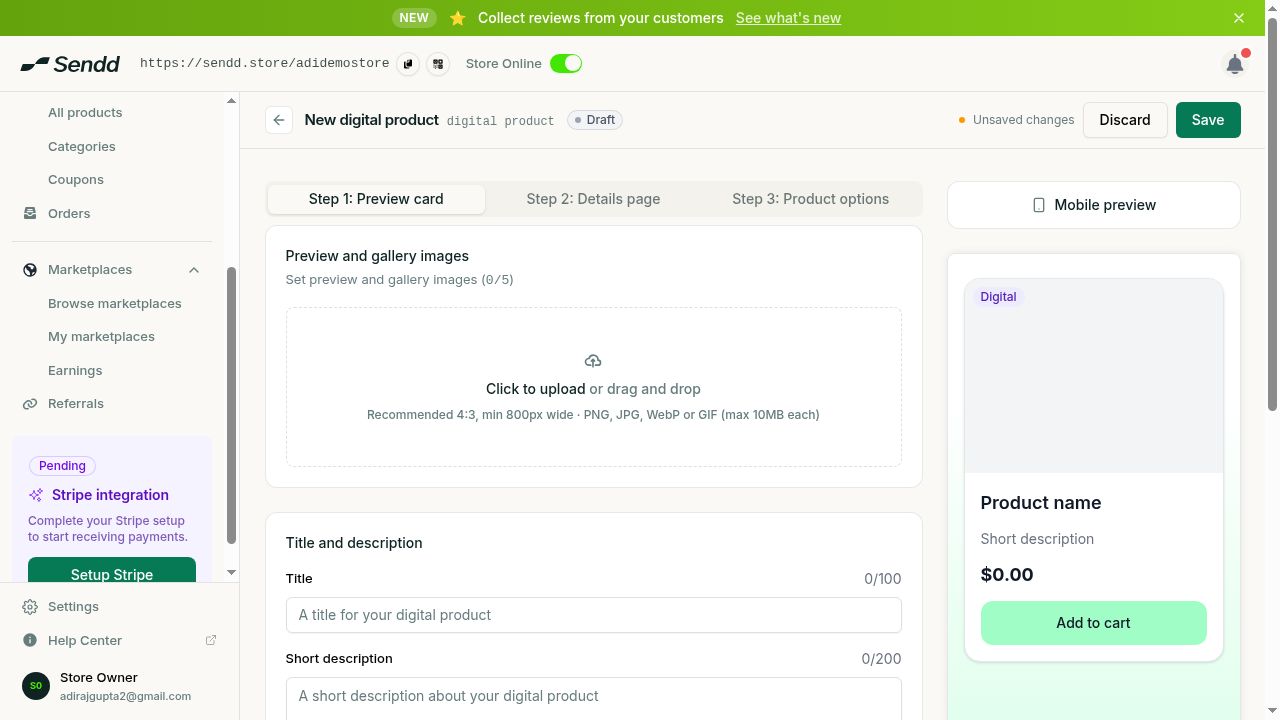 The digital product builder leads with your gallery and details.
 -
On Step 2, write a clear
Detailed descriptionexplaining exactly what the buyer receives. -
Review your
Sendd Marketplacessettings to decide on discoverability beyond your storefront. -
On Step 3, add
FAQsto answer common questions, and turn onForm collectionif you need extra information from the buyer. -
Select
Publish, or selectSave as draftto finish later.
Understanding the options and fields
Because digital products are delivered rather than shipped, there is no shipping setup to configure, so Step 3 can be as simple as adding a couple of FAQs and publishing. Your Title and Detailed description carry more weight for digital products than for physical ones, since the buyer is trusting your description to know exactly what they are getting before the file lands in their hands. Sendd Marketplaces settings in Step 2 let you extend the reach of a digital product beyond just your own storefront traffic, which can be especially useful for standalone digital goods like templates or music.
Use-case examples
- An author lists an eBook with a compelling cover image, a full description of the chapters and a price, so readers know exactly what they are buying before checkout.
- A designer offers a free set of presets at a price of 0 as a lead magnet, using the Digital product type to deliver the download instantly and grow their audience.
- An educator builds a video course as a digital product, adds FAQs about access length and format and publishes it without touching any shipping settings.
Tip. Use a free digital product priced at 0 as a lead magnet. It is a low-friction way to grow your audience and introduce new customers to your store before they buy something paid.
Note. Digital products are delivered to the buyer on purchase, so there is nothing to configure in Shipping, delivery and pickup for this product type.
Frequently asked questions
How does the customer receive a digital product after buying?
The digital item is delivered to the buyer on purchase, so there is no packing or shipping involved on your end.
Can I offer a free digital download as a lead magnet?
Yes, set the Price field to 0 in Step 1 to offer a free digital download, which works well as a lead magnet for growing your audience.
Do I need to fill in shipping settings for digital products?
No, digital products have no shipping since they are delivered directly to the buyer, so you can skip that setup entirely.
What kinds of digital products can I sell on Sendd?
You can sell eBooks, video, templates, presets, music, printables and courses, among other downloadable or deliverable digital items.
Can I update a digital product file after publishing it?
Yes, published digital products appear under My products, All products, where you can open and edit them, including their description and files.
What should I include in a digital product description?
Write a clear Detailed description on Step 2 that tells buyers exactly what they will receive, since there is no physical unboxing to show them.
Can I use Sendd Marketplaces to help sell digital products?
Yes, review the Sendd Marketplaces settings on Step 2 to decide whether your digital product should be discoverable beyond your own storefront.
Do I still need Stripe connected to sell a digital product?
Yes, like every product type, a digital product can only be sold once Stripe is connected to your store, even after it is published.
Next steps. Encourage repeat buyers with coupons, or explore flexible pricing with custom price products.
Related articles