How to capture leads with enquiry products on Sendd
Turn product pages into lead forms with flexible pricing and an Enquire now button
Category: Ways to sell
If you sell consultations, bespoke work, custom quotes or high-ticket services, the Enquiry product type on Sendd lets you turn a product page into a lead capture tool instead of an immediate checkout. Rather than an Add to cart button, shoppers see an Enquire now button, so you can follow up personally before any money changes hands.
What it is and when to use it
An enquiry product does not push customers straight to checkout. Instead, it generates a lead, giving you the chance to have a conversation, send a quote or scope out a project before the sale happens. It is well suited to:
- Consultations and advice sessions
- Expert or professional advice
- Bespoke or custom quotes
- High-ticket items that need a conversation first
- Services that vary depending on the customer’s needs
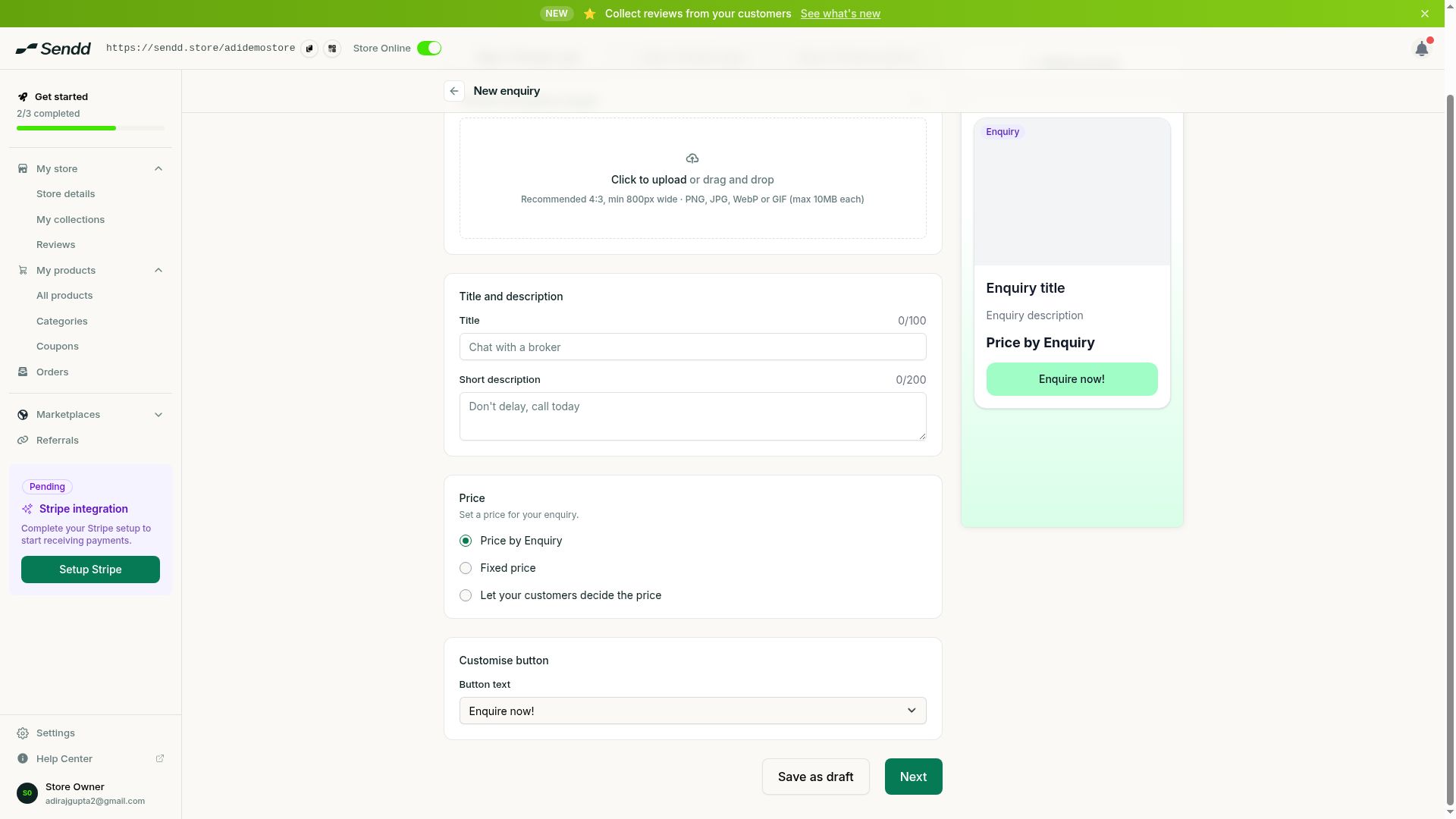
Enquiry products use an Enquire now button and flexible pricing.
How to create an enquiry product
Steps:
- Go to
My products, then selectAll productsand selectAdd new product. - Choose the
Enquiryproduct type. - In Step 1, add your title, description and gallery images to explain what you offer.
- In the
Pricesection, choose one of three options:Price by Enquiry,Fixed priceorLet your customers decide the price. - Move to Step 3 and turn on the
Formcollection option so you capture the customer’s details along with their enquiry. - Review your product options in Step 3, then select
Publish. - Once live, your storefront shows an
Enquire nowbutton in place of Add to cart.
Understanding the options and fields
- Price by Enquiry. No price is shown to the customer, they simply submit an enquiry and you follow up with pricing based on their specific needs.
- Fixed price. You set a set price the customer sees before enquiring, useful when your service has a known cost but you still want to gather details first.
- Let your customers decide the price. The customer suggests their own amount as part of their enquiry, similar in spirit to a pay-what-you-want product.
- Form. A Step 3 collection option that gathers the customer’s details (such as contact information and requirements) alongside their enquiry, so you have everything you need to follow up.
- Enquire now button. Replaces the usual Add to cart button on the storefront, signalling to customers that this is a request rather than an instant purchase.
Use case examples
- Consulting service. A consultant sets Price by Enquiry and adds a Form to capture the client’s business needs before quoting a rate.
- Custom furniture maker. A maker sets Fixed price for a standard piece, but still uses the Enquire now flow so they can discuss dimensions and finishes with the customer first.
- High-ticket coaching package. A coach uses Let your customers decide the price so prospective clients can indicate their budget when they reach out, helping the coach tailor their proposal.
Tip. Always pair your enquiry product with the Form collection option in Step 3. Without it, you may only receive a bare enquiry with none of the context you need to respond well.
Note. Because enquiry products do not take payment on the spot, they are best treated as the start of a sales conversation rather than a completed sale.
Frequently asked questions
How do enquiries reach me?
When a customer selects Enquire now and submits their details, their enquiry comes through as a lead you can follow up on directly.
How do I capture customer details with an enquiry product?
Turn on the Form collection option in Step 3 so customers submit their details alongside their enquiry.
Can I offer an enquiry product with no set price?
Yes. Choose Price by Enquiry in the Price section, and no price is shown to the customer before they enquire.
Is the enquiry product type good for services or custom quotes?
Yes. It is designed for exactly that: consultations, bespoke work, custom quotes and other high-ticket or personalized offerings.
What is the difference between an enquiry product and a custom price product?
A custom price product takes payment immediately with the customer choosing the amount. An enquiry product generates a lead first, using an Enquire now button, and payment happens later or separately.
Can I still set a fixed price on an enquiry product?
Yes. Choose Fixed price in the Price section if you want customers to see a set cost before they enquire.
Can customers suggest their own price on an enquiry product?
Yes, if you choose Let your customers decide the price, customers can indicate the amount they have in mind as part of their enquiry.
How do I turn an enquiry into an actual sale?
Follow up with the lead using the details captured through the Form, then complete the sale through your usual checkout or invoicing process once you have agreed on the details.
Next steps. If you decide you would rather take payment immediately with flexible amounts, compare this with Custom price products, and once leads start coming in, keep track of your sales pipeline from Orders.
Related articles