How to set up rental products on Sendd
Price items by the day for hire and adjust rates for longer rentals with the factors feature
Category: Ways to sell
If you rent out equipment, furniture, party supplies, games, lighting or gear instead of selling it outright, the Rental product type on Sendd lets you price items by the day and manage stock across one or more locations. You can also fine-tune your pricing so longer rentals automatically cost more or less per day using the optional factors feature.
What it is and when to use it
A rental product charges customers a daily rate for the duration they hire an item, rather than a single flat price. It is built for businesses that hire out physical items rather than sell them, such as:
- Equipment and tools
- Furniture for events
- Party supplies
- Games and games equipment
- Lighting and staging gear
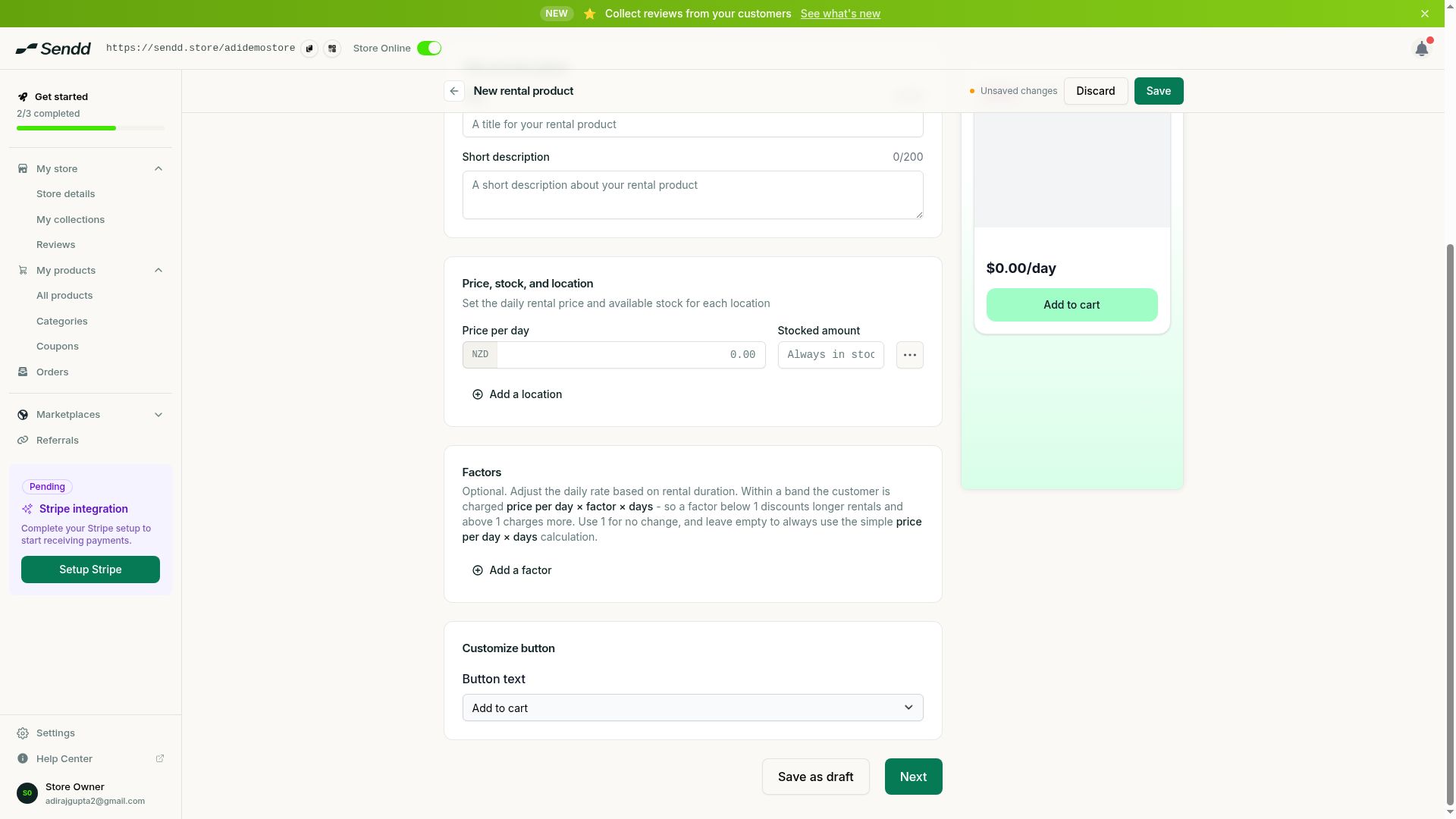 Rentals price per day and can adjust rates by duration using factors.
How to create a rental product
Steps:
- Go to
My products, then selectAll productsand selectAdd new product. - Choose the
Rentalproduct type. - In Step 1, add your title, description and gallery images as usual.
- Set your
Price per day, which is the base daily hire rate for the item. - Set your
Stockedamount to reflect how many units of this item you have available to rent out. - If you hire from more than one location, select
Add a locationto track stock separately at each site. - If you want to adjust pricing for longer or shorter hires, fill in the optional
Factorssection, otherwise leave it empty to always charge the simple price per day times number of days. - Continue through Step 2 for your details page and Step 3 to review product options, then select
Publish.
Understanding the options and fields
- Price per day. The base daily rate for hiring the item.
- Stocked. The number of units of this item you have available to rent at any one time.
- Add a location. Lets you track stock separately across multiple pickup or delivery locations, so each site has its own available quantity.
- Factors. An optional way to adjust the daily rate based on how many days the customer rents for. Within a set band of days, the charge becomes price per day times factor times days. A factor below 1 discounts longer rentals, while a factor above 1 charges more for that band. Leave Factors empty and the customer is simply charged price per day times days.
Use case examples
- Weekend discount. A tool hire company sets a factor below 1 for rentals of 3 to 7 days, so customers who keep equipment over a long weekend pay less per day than someone hiring for a single day.
- Short-notice premium. An event furniture supplier sets a factor above 1 for very short one-day rentals, reflecting the extra handling cost of quick turnaround hires.
- Multi-location gear hire. A camera equipment renter uses
Add a locationto keep separate stock counts at two branches, so customers can only book units that are actually available at their nearest site.
Tip. If you are not sure how to price longer hires yet, leave Factors empty at first and simply charge price per day times days. You can always come back and add a discount band once you have a sense of demand.
Note. Factors only change pricing within the band of days you set them for. Rentals outside any defined band fall back to the simple price per day times days calculation.
Frequently asked questions
How does rental pricing work on Sendd?
You set a price per day, and by default a customer is charged that price multiplied by the number of days they rent the item for.
How do I discount longer rentals?
Use the optional Factors feature. Set a factor below 1 for a band of days, and the charge for rentals in that band becomes price per day times factor times days, which lowers the effective daily rate.
Can I charge more for short rentals instead?
Yes. Set a factor above 1 for a short band of days if you want to charge a premium for quick turnaround hires rather than a discount.
Can I manage rental stock across multiple locations?
Yes. Use Add a location to track stock separately at each site you hire from.
How do I set how many units are available to rent?
Set your Stocked amount to the number of units of that item you have on hand to hire out.
Can I take a deposit for a rental?
Rental products are priced by the day using the price per day and factors fields described above. For anything beyond that daily pricing structure, check how your store’s other pricing tools might apply.
What happens if I leave the Factors section empty?
The customer is simply charged the price per day multiplied by the number of days they rent, with no adjustment for rental length.
Do customers choose their own rental dates?
Customers select the duration of their hire, and the total is calculated using your price per day (and any factors you have set) multiplied by that duration.
Next steps. If you deliver rental items, review your Shipping settings, and keep an eye on hires and returns from Orders.
Related articles